About the room
- Capacity
- 30
- Facilities
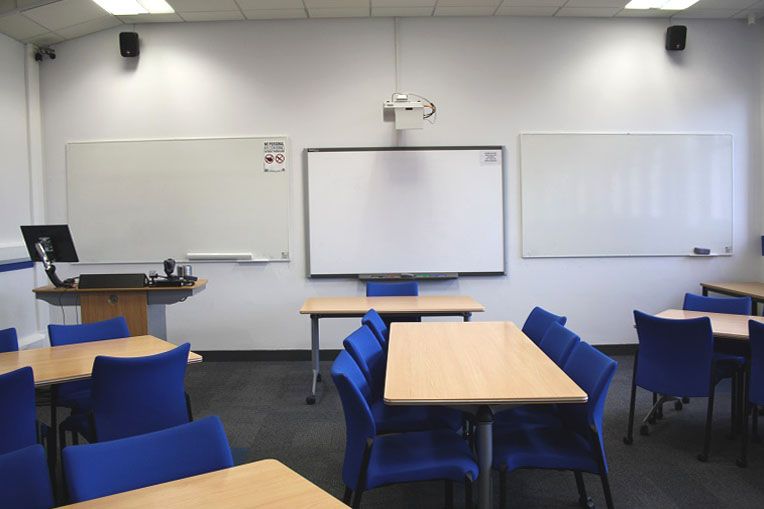
- Blu-ray Player, Interactive Monitor, Laptop connection, Multi region DVD player, Simultaneous writing/projection provision, Visualiser, Whiteboard
- Type of room
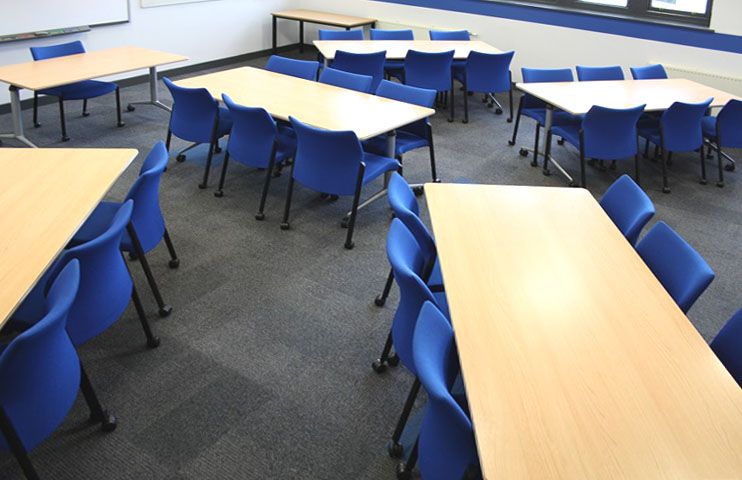
- Flat floored room, Moveable tables
- Seating layout
- Cabaret
- Lecture capture grade
- Silver
Location
- Department
- General Teaching Space
- Directions
- Go past main reception (on your left), through the double doors straight ahead, and up the stairs to the first floor. Go through the doors, along the corridor, through one set of double doors, and room 1.05 is on the left.
- Campus map
- View the campus map
Accessibility
- Accessibility
- Assistive Listening System, Level Access (Audience), Level Access (Presenter), Wheelchair Access (Audience)
- Accessibility information
-
This room is flat with level access via the lift and there is a height adjustable desk available. The chairs have wheels and are mainly without arms, however, there is a chair with arms if required. An infrared assistive listening system is fitted in this room. To use this facility an IR receiver is needed. If you have a receiver, you can sit anywhere in the room where you have a clear view of the presenter. For further advice on IR receivers please contact the Facilities Management Service Desk.
If your access needs aren't addressed in the information above, please visit Disability Services for further information and contact details. - Accessibility directions
- As standard directions, but take lift to first floor (entrance to lift in stairwell).
Lecture Capture
Lecture Capture Room standards
Changes for 2026/27: The University uses Panopto as its lecture capture and media management system and room standards have been simplified for users.
- Platinum has been removed as a standalone standard.
- Silver Plus rooms have now been reclassified as Gold.
- Platinum rooms have been reclassified as Gold with Multi-source Recording.
Bronze rooms
Bronze rooms are set for lecture capture recording of room audio and the presented content feed. They do not have a camera feed for recording.
Silver rooms
Silver rooms include lecture capture recording of room audio, the presented content feed, and a camera view focused on the presenter, lectern and teaching area.
Gold rooms
Gold rooms include lecture capture recording of room audio, the presented content feed, and a tracking camera that automatically tracks the presenter within the teaching area.
Additional Multi-source Recording Capability
Multi-source Recording functionality relates to additional content feeds sent to the recorder. In these spaces, multiple content sources (eg. Dual Projection) can be captured and recorded as separate feeds.
For help and information, visit the Digital Education Systems Help Site
Common features and presenter guidance
- Lecture capture systems record the presentation content feed and room audio.
- Use the available room microphone where provided. In rooms with a lapel microphone, this will give the best result for presenter audio and ensures those who are hard of hearing are included.
- Use the lectern recording control to pause or restart the recording.
- All rooms feature a red light which will indicate when a session is being recorded.
Font Size and Readability
Use fonts that are large enough to be clearly read by students in the room and when viewing lecture recordings.
Recommended minimum font sizes:
- Titles: 36-44 pt
- Main body text: 18-24 pt
- Chart labels and captions: 16-20 pt
- Footnotes (where necessary): Minimum 14 pt
Avoid using body text smaller than 18 pt, as it can be difficult to read on projectors, shared screens, and lecture capture recordings. Using appropriate font sizes improves readability, supports accessibility, and helps students focus on key information whether attending in person or viewing recordings later.